Why DFAM is different from "design for manufacturing"
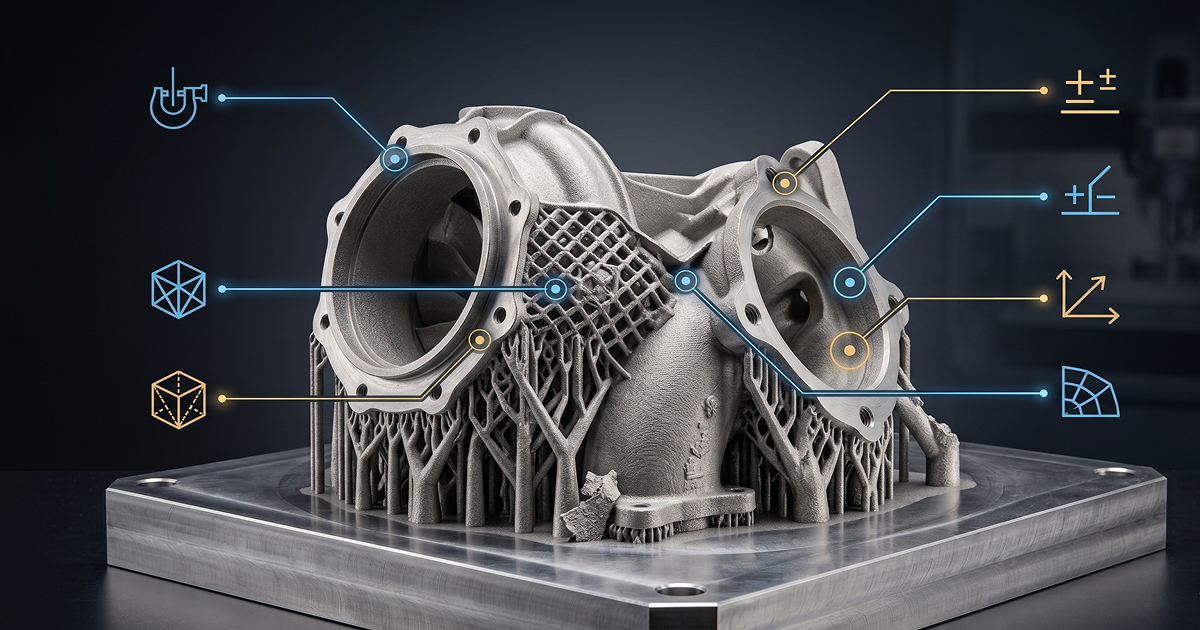
Designing for CNC is mostly about avoiding what tools can't reach. Designing for sheet metal is about respecting bend radii and material thickness. Designing for metal 3D printing — typically laser powder bed fusion (LPBF) — is more demanding: orientation, supports, residual stress, powder removal, and post-machining all interact, and they all have a cost.
Most DFAM guides explain the physics. This one explains the cost levers. Each of these twelve rules moves a real line item on your LPBF quote — build time, support time, machining time, or scrap rate. Get them right and the same part quotes 30–50% lower than the engineer who didn't.
Rule 1: Orientation is the biggest cost lever
Build orientation determines support volume, build time, surface quality on critical faces, and risk of failure. The same part oriented two ways can cost very different amounts to print.
What changes with orientation:
- Build height — the part has to be built one layer at a time, so taller orientations take longer regardless of cross-section. Lying a part flat usually beats standing it up.
- Support volume — overhangs need support material that adds powder cost, build time, and removal cost. Reorient to minimise overhanging surfaces.
- Critical surface placement — surfaces that sit on supports come out rougher than upward-facing surfaces. Plan critical surfaces upward or vertical.
- Residual stress — long flat unsupported sections in the build direction warp. Stagger or break up large flats.
What to do: send the supplier the STEP file with your preferred orientation flagged. Then ask them to confirm or counter-propose. Their build engineer will spot trade-offs you can't see in CAD.
Rule 2: Design for self-supporting overhangs
Overhangs steeper than ~45° from horizontal print without support on most LPBF machines. Some platforms tolerate 30–40°. Below that, you're paying for supports.
Concrete moves:
- Replace flat horizontal overhangs with chamfers or fillets that ramp down at >45°.
- If a horizontal feature is non-negotiable, design it short — a small unsupported overhang under ~1 mm typically prints fine even at 0°.
- For longer overhangs, design integrated webs or ribs that double as supports — they stay in the part and need no removal.
Cost impact: support material is ~10–25% of part build time on poorly oriented parts. Removing it post-build can take longer than the print itself.
Rule 3: Internal channels — diameter, profile, orientation
Internal channels are the killer feature of metal AM — but they need to be designed to print without internal supports, because removing supports inside an enclosed channel is impossible.
Rules of thumb:
- Vertical channels (parallel to build direction): self-supporting up to large diameters.
- Horizontal channels (perpendicular to build): self-supporting up to ~8–10 mm diameter as round; larger diameters need teardrop or diamond profiles to print without supports.
- Channels at 45°: usually fine across most diameters.
- Channels >15 mm diameter, horizontal: split into multiple smaller channels, or use teardrop profile, or accept that supports will be needed (and design an access port).
Powder removal is the other constraint — see Rule 10.
Rule 4: Wall thickness — minimum and maximum
LPBF has both a minimum and a maximum wall thickness that matter:
- Minimum wall: typically 0.3–0.5 mm depending on machine, material, and feature length. Walls below this fail to print or warp from residual stress.
- Maximum unbroken wall: sections thicker than ~10–15 mm accumulate residual stress as they cool, leading to warping or cracking. Break up large solid sections with internal lattice, hollow them out with drainable cavities, or use ribbed structures.
The sweet spot: walls of 1–5 mm, ribbed where they need stiffness, hollow where they don't need solid material. This is also where most weight reduction happens.
Rule 5: Avoid large flat downward-facing surfaces
Downward-facing flat surfaces — surfaces that face the build plate — print poorly. They need support, the surface comes out rough (Ra 12–25), and the supports leave witness marks that need post-machining.
Fixes:
- Tilt the part 5–15° so the surface isn't perfectly horizontal — this dramatically reduces support need.
- Replace large flats with curved or ribbed structures.
- If the flat is non-negotiable (sealing surface, mating face), accept that it will be machined post-print — design with stock for finishing and clear datums.
Rule 6: Hole orientation and finishing strategy
Holes printed vertically (along the build direction) are clean, round, and dimensionally good. Holes printed horizontally suffer from layer stepping at the top and bottom, and round holes >8 mm need supports or teardrop profiles.
For any critical-fit hole — bearing, dowel, threaded — assume it will be finish-machined post-print. Design the hole undersized by 0.3–0.5 mm so there's stock for reaming or boring. For threaded holes, leave the as-printed hole oversize and tap it post-print using a clear setup datum.
Rule 7: Topology optimisation — only optimise what matters
Topology-optimised parts look impressive but introduce real problems if applied carelessly:
- Over-optimised parts have very thin sections that print marginally and finish poorly.
- Organic shapes are hard to fixture for post-machining of critical surfaces.
- Inspection is difficult — CMM probes can't reach internal organic geometry, and X-ray inspection is expensive.
What to do: optimise around the load case and manufacturability simultaneously. Constrain the optimisation algorithm to maintain printable wall thicknesses, accessible critical surfaces, and clean datums for fixturing. The goal is a part that's lighter and printable, not lighter and unbuildable.
Rule 8: Lattice — use sparingly and intentionally
Lattice structures are the most overused feature in metal AM design. They look good in CAD; they're slow to print, hard to depowder, and rarely earn their keep.
Lattice makes sense when:
- Weight reduction is critical and the lattice replaces a solid section that's too heavy.
- Heat exchange or fluid flow benefits from the lattice surface area.
- Bone-ingrowth (medical implants) requires open porosity at a specific scale.
Lattice is a bad idea when:
- It's added "because we can." A solid wall with strategic ribs is usually lighter and faster.
- Powder removal isn't planned — closed lattice traps powder forever.
- The part needs to be inspected internally — lattice obscures CMM and X-ray.
Rule 9: Part consolidation — when it pays back
Replacing a multi-part assembly with a single printed part is one of metal AM's headline benefits. It's also misapplied frequently.
Consolidation pays back when:
- The eliminated joints would otherwise be weld points, fasteners, or brazed joints — each adding labour, inspection, and potential failure modes.
- The consolidated geometry fits in the build envelope economically (i.e. doesn't grow the build height excessively).
- The original assembly required tight tolerance stack-up — a consolidated part eliminates that.
Consolidation doesn't pay back when:
- The consolidated part becomes too tall to nest with others on a build plate.
- Critical interfaces still need post-machining — and the post-machining is harder on a complex consolidated shape than on the original simple parts.
- One of the original sub-assemblies is replaced or maintained separately — the consolidated part becomes a single point of failure.
Rule 10: Design for powder removal
Internal cavities trap unfused powder. If powder can't be removed, the part is heavier than designed, can't be inspected, and may not pass density requirements after HIP.
Rules:
- Every enclosed cavity needs at least one drainage hole — typically >5 mm diameter, oriented to allow gravity drainage in the de-powdering position.
- Long internal channels need both an inlet and outlet — powder won't shake out of a closed-ended channel.
- Lattice fills need access ports sized to the lattice cell — too small and the powder bridges and stays put.
- Rough internal surfaces hold powder more than smooth — consider design tweaks to make internal surfaces self-supporting and smooth.
If the part can't be designed with drainage, accept that depowdering will require ultrasonic cleaning, inverted cycling, or — in worst cases — sectioning the part to confirm cleanliness. None of these are cheap.
Rule 11: Fillet sharp edges, plan for stress
Sharp internal corners concentrate residual stress. They're also where cracks initiate during the build and where parts fail in service.
Defaults:
- Internal corners: minimum 0.5–1 mm fillet wherever possible.
- Transitions between thick and thin sections: blend gradually, not abruptly. Sudden changes in cross-section drive residual stress and warping.
- External corners: chamfer or fillet to reduce burrs in support removal.
The same fillet that helps fatigue life also helps the print succeed. It's a free win.
Rule 12: Plan critical surfaces for post-machining from day one
Almost every functional metal AM part has at least one surface that will be machined post-print — sealing face, bearing fit, mating interface, threaded hole. Design for that machining from the start, not as an afterthought.
What to include in the CAD:
- Stock allowance on every critical surface — typically 0.3–0.7 mm of extra material to clean up in machining.
- Clear setup datums — flat external surfaces or features the machinist can reference. A topology-optimised blob with no flat anywhere is a fixturing nightmare.
- Fixturing features — even temporary lugs or tabs that get machined off later but allow the part to be held during finishing.
- Tolerance specification — be explicit about which surfaces need ±0.025 mm and which can stay as-printed at ±0.2 mm. Suppliers will quote both prices.
The cost levers, ranked
Of all twelve rules, these move the quote most:
- Orientation — biggest single lever. Bad orientation can double build time and triple support cost.
- Support minimisation — design for self-supporting angles wherever possible.
- Wall thickness — too thin = scrap rate; too thick = residual stress and machining stock.
- Post-machining clarity — under-specified surfaces get over-quoted.
- Powder removal access — missing drainage holes turn into expensive depowdering work or scrapped parts.
Common mistakes that inflate quotes
- Designing the part flat in CAD and assuming the supplier will figure out orientation. They will, but it'll be the orientation that's safest, not cheapest.
- Adding lattice "because metal AM can do lattice." Solid walls with ribs are usually lighter, faster, and cheaper.
- Specifying as-printed tolerances on surfaces that obviously need machining. The supplier quotes the worst case — finishing every surface to spec.
- Forgetting drainage holes on enclosed cavities. Discovered during de-powdering, fixed by sectioning the part.
- Over-optimising topology without considering fixturing. The part is 30% lighter and 200% harder to finish.
- Specifying minimum wall at 0.3 mm everywhere. Some features need it; most don't. Defaulting to thin walls multiplies scrap risk.
- Ignoring residual stress in long flats. Parts come off the plate warped; correction work eats the cost saving from the optimised design.
The DFAM checklist
Before you send the STEP file, walk this list:
- ☐ Build orientation flagged or proposed.
- ☐ Overhangs ≥45° wherever possible; supports planned where not.
- ☐ Internal channels self-supporting (vertical, <10 mm horizontal, or teardrop).
- ☐ Walls between 0.5 and 10 mm; thick sections broken up.
- ☐ Critical surfaces oriented upward or vertical, not down-facing.
- ☐ Holes designed undersized for finish-machining if critical.
- ☐ Topology optimisation constrained for printability and fixturing.
- ☐ Lattice used only where it earns its keep and powder removal planned.
- ☐ Consolidation justified by joint elimination, not by reflex.
- ☐ Drainage holes on every enclosed cavity.
- ☐ Internal corners filleted, transitions gradual.
- ☐ Stock allowance, datums, and tolerances specified for post-machining.
Hit ten or more and your part will quote materially better than the average DFAM-naive design at the same supplier.
Where this fits in the bigger picture
DFAM only matters if metal AM is the right process in the first place. Most parts shouldn't be printed — they should be machined, sheet-fabricated, cast, or moulded. The decision sits one level up from design rules: pick the process first, then design for it. The Process Selection guide covers that decision in detail.